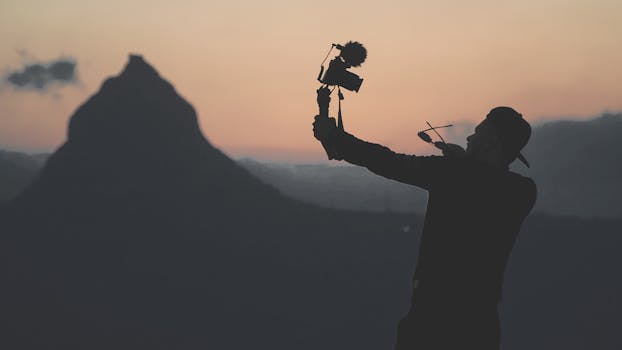
The Art of Accelerated Beauty: How to Create Trending Travel Time-Lapse Videos
Remember that feeling? Standing on the edge of the caldera in Santorini, watching the sun dip below the Aegean Sea, painting the sky in fiery oranges and soft purples. It’s a moment that feels both fleeting and eternal. I tried to capture it with my phone, snapping photo after photo, but it never quite conveyed the magic, the movement of that descent.
That was before I discovered the power of the time-lapse.
My first real time-lapse attempt was a disaster. I set up my camera on a wobbly tripod at Oia, thinking I just needed to hit record. Two hours later, I had a shaky, underexposed mess that looked more like a bad flipbook than a cinematic masterpiece. But the idea, the potential, was there. I saw other travelers with their slick, professional-looking time-lapses, compressing hours into seconds, and I knew I had to learn.
Fast forward a few years, countless hours of practice, and a few upgraded gadgets, and now I can confidently say that time-lapses are one of my absolute favorite ways to capture the essence of a place. From the frantic energy of Tokyo’s Shibuya Crossing to the serene, slow dance of clouds over the Dolomites, time-lapses transform static scenes into dynamic stories. And guess what? They’re absolutely trending right now on every social media platform! Short-form video is king, and a well-executed time-lapse grabs attention like nothing else. Ready to turn your travel memories into viral gold? Let’s dive in!
Why Time-Lapse? The Magic of Compressed Moments
Before we get into the nitty-gritty, let’s talk about why time-lapses resonate so much. In a world saturated with instant gratification and shrinking attention spans, a time-lapse offers a unique perspective. It allows us to witness changes that are usually too slow for the human eye to perceive – a sunrise, a bustling city, stars traversing the night sky – all in a matter of seconds.
It’s about storytelling. Imagine trying to explain the sheer volume of people crossing Shibuya, or the incredible speed at which clouds roll over a mountain peak. A time-lapse doesn't just show it; it feels it. It evokes wonder, curiosity, and often, a sense of awe. This compression of time creates a dramatic, almost surreal effect that is inherently shareable and captivating. On platforms like Instagram Reels, TikTok, and YouTube Shorts, where quick, visually striking content thrives, a perfectly crafted time-lapse can easily go viral. It’s not just a video; it’s an experience.
Gear Up: Your Essential Time-Lapse Travel Kit
You might think you need a full professional setup, but the truth is, you can start with what you already have! The key is understanding the fundamentals.
1. The Camera: Your Eye to the World
- Smartphone (Entry-Level & Convenient): Modern smartphones like the latest iPhones, Google Pixels, and Samsung Galaxies have fantastic built-in time-lapse modes. They’re incredibly convenient, always with you, and surprisingly capable for quick, casual time-lapses. The limitations are usually manual control (ISO, shutter speed, focus) and battery life over extended periods. Price point: Free (if you own one).
- Mirrorless or DSLR Camera (Pro-Level & Versatile): This is where you unlock true creative control. Cameras like the Sony Alpha series, Canon EOS R/RP, Nikon Z series, or older DSLR models offer manual settings for aperture, ISO, shutter speed, and white balance – crucial for high-quality time-lapses, especially for challenging conditions like day-to-night transitions. They also allow for interchangeable lenses, giving you more flexibility.
- My go-to: I personally shoot with a Sony a7III. Its low-light performance and battery life are fantastic for those epic night sky time-lapses in places like Iceland or the deserts of Jordan.
- Price point: Mid-range mirrorless/DSLR bodies start around $800-$1500; lenses vary widely.
2. The Tripod: Stability is Non-Negotiable
This is arguably the most critical piece of gear. A shaky time-lapse is an unusable time-lapse.
- Travel Tripod (My Recommendation): Look for lightweight carbon fiber tripods that pack down small. Brands like Peak Design, Manfrotto BeFree, and MeFoto offer excellent options. They should be sturdy enough to withstand moderate wind. Price point: $150-$400.
- Heavy-Duty Tripod (For Extreme Conditions): If you're often shooting in windy conditions or with heavy lenses, a more robust aluminum tripod might be necessary. But for most travel, a good travel tripod is sufficient.
- Phone Tripod Adapter: If using your smartphone, get a sturdy adapter that securely clamps your phone to any standard tripod. Price point: $10-$30.
3. Intervalometer: The Brain of Your Operation
An intervalometer tells your camera to take a photo at specific intervals (e.g., every 5 seconds).
- Built-in Intervalometer: Many modern mirrorless and DSLR cameras have this feature built-in. Check your camera’s menu! This is the simplest solution.
- External Intervalometer: If your camera doesn't have one, you can buy a wired or wireless remote intervalometer that plugs into your camera. Price point: $20-$70.
4. Power Solutions: Don’t Get Caught Short!
Time-lapses consume a lot of battery.
- Extra Batteries: Always carry at least two spare batteries for your camera.
- Power Bank (Essential for Long Shoots): For extended time-lapses (over an hour), a high-capacity USB-C power bank paired with a dummy battery (if your camera supports USB charging or a dummy battery with a DC coupler) is a lifesaver. I've used my 20,000 mAh Anker power bank to keep my Sony running for 6-8 hours for night sky time-lapses in the Wadi Rum desert. Price point: $40-$100.
5. Storage: You’ll Need Space
Time-lapses generate hundreds, if not thousands, of RAW image files.
- High-Capacity SD Cards: Invest in fast (UHS-II recommended) and high-capacity (64GB-128GB per card) SD cards. You don’t want to run out of space mid-shoot. Price point: $30-$80 per card.
Mastering the Shot: Planning & Execution
This is where the magic truly happens. A great time-lapse isn't just about pressing a button; it's about anticipation, precision, and patience.
1. Location Scouting & Planning: The Foundation
- Research: Before you even leave your hotel, research your desired location. What direction does the sun rise/set? Are there any interesting elements that move (clouds, water, crowds, traffic)? What's the weather forecast? Apps like PhotoPills or The Photographer's Ephemeris are invaluable for tracking sun/moon positions.
- Golden Hour & Blue Hour: These are your best friends. The soft, warm light of golden hour (shortly after sunrise, before sunset) and the cool, ethereal tones of blue hour (after sunset, before sunrise) create incredibly cinematic time-lapses. Imagine the Eiffel Tower lighting up against a deep blue sky!
- Dynamic Elements: Look for movement. Clouds drifting over mountains (like the epic ones I shot in Patagonia), waves crashing on a beach, light trails from cars on a highway (think Hong Kong's Tsim Sha Tsui promenade), or people bustling through a market. Static scenes rarely make for compelling time-lapses.
- Safety First: When setting up your camera, ensure it’s in a safe, unobstructed location where it won’t be knocked over or stolen. I once spent an hour setting up a time-lapse of a sunset over the Grand Canal in Venice, only to have a tourist accidentally kick my tripod. Lesson learned!
2. Camera Settings: Precision is Key
Always shoot in Manual Mode for consistency.
- Manual Focus: Set your focus manually and then lock it. Autofocus can hunt, causing flickers in your final video.
- Manual White Balance: Set a specific Kelvin temperature or choose a preset (e.g., "Daylight," "Cloudy"). Auto white balance will cause color shifts between frames.
- Aperture (f-stop): Choose an aperture that gives you sufficient depth of field (e.g., f/8 to f/16 for landscapes). Lock it in.
- ISO: Keep your ISO as low as possible (e.g., ISO 100-400) to minimize noise, especially for daytime shots. For night shots, you'll need to increase it, but be mindful of noise.
- Shutter Speed: This is crucial for motion blur.
- Daytime: Aim for a shutter speed that allows for a slight blur in moving objects (e.g., 1/50th to 1/200th of a second). If it's too fast, moving objects will look choppy.
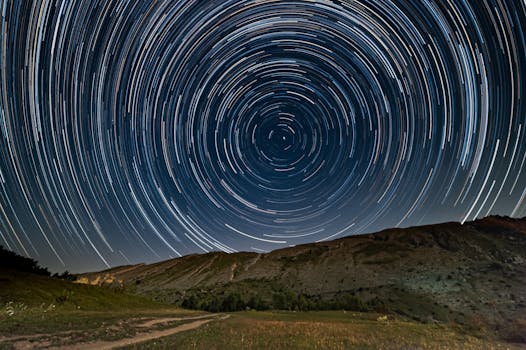
- Nighttime/Stars: You'll need longer exposures (e.g., 10-30 seconds) to capture enough light and star movement.
- Interval (The Gap Between Photos): This determines the speed of your final video.
- Fast-moving objects (cars, people): 1-3 seconds.
- Clouds, sunrise/sunset: 5-10 seconds.
- Stars, aurora: 15-30 seconds.
- Calculation Tip: If you want a 10-second video at 24 frames per second (fps), you need 240 photos. If your event lasts 2 hours (7200 seconds), you’d set your interval to 7200 / 240 = 30 seconds. This is a rough guide; experiment!
- Day-to-Night (Bulb Ramping): This is advanced but incredibly rewarding. For sunsets transitioning into starry nights, you need to gradually adjust your exposure settings (shutter speed, ISO, aperture) as the light changes. Some advanced intervalometers and camera firmwares (like Magic Lantern for Canon) can do this automatically. Otherwise, you'll need to manually adjust settings every few minutes or use post-processing techniques to smooth the transitions.
3. Framing & Composition: Tell Your Story
- Rule of Thirds: Place your main subject (e.g., a mountain peak, a building) along the intersecting lines or at the intersections.
- Leading Lines: Use roads, rivers, or architectural elements to draw the viewer's eye into the scene.
- Foreground Interest: A rock, a flower, or a railing in the foreground adds depth and makes the scene more engaging.
- Negative Space: Don't be afraid to leave open areas (like a vast sky or ocean) to create a sense of scale and drama.
- The Horizon: Keep it straight! Use your camera’s built-in level if it has one. A crooked horizon is distracting.
4. Stability is Key: Fight the Elements
- Wind: Wind is the enemy of time-lapses. If it's windy, extend your tripod legs as little as possible, hang your camera bag from the center column for added stability, and consider using a heavier tripod. I’ve battled strong winds in the Faroe Islands, and a sturdy tripod with a weighted bag saved my shots.
- Vibrations: Avoid setting up your tripod on wobbly surfaces like wooden decks or bridges where foot traffic can cause vibrations.
- Secure Your Camera: Make sure your camera is tightly mounted to the tripod plate and the plate is securely attached to the tripod head. Double-check everything before you walk away.
5. Power Management: The Long Haul
- Disable Unnecessary Features: Turn off image stabilization (if your camera is on a tripod), review screen, and Wi-Fi/Bluetooth to conserve battery.
- Monitor Battery: Keep an eye on your battery level, especially for long shoots. Swap batteries or connect your power bank before it dies.
Post-Production Magic: Bringing It All Together
Once you have hundreds, or even thousands, of individual photos, it’s time to stitch them into a masterpiece.
1. Software: Your Digital Darkroom
- Adobe Lightroom Classic (My Favorite): This is fantastic for editing your RAW sequence. You can apply edits (exposure, contrast, color grading, sharpening, noise reduction) to one photo and then sync them across all frames. Lightroom also has an excellent deflicker tool. You can then export the sequence as JPEGs or directly as a video file. Price: Part of Adobe Creative Cloud subscription (~$10/month).
- Adobe After Effects / Premiere Pro: For more advanced users, After Effects is excellent for stabilizing hyper-lapses, adding motion graphics, and advanced deflickering. Premiere Pro is a full-fledged video editor where you can assemble your time-lapse, add music, sound effects, and further color grade. Price: Part of Adobe Creative Cloud subscription.
- DaVinci Resolve (Free & Powerful): A professional-grade video editing suite that offers incredible color grading, editing, and even a dedicated Fusion page for visual effects. The free version is incredibly capable. Price: Free / Studio version $295 (one-time).
- LRTimelapse (Dedicated Time-Lapse Tool): This software integrates with Lightroom and is specifically designed for time-lapse workflows, especially for complex day-to-night transitions (Holy Grail time-lapses). Price: Free basic version / Paid Pro versions.
- Mobile Apps (For Phone Time-Lapses): CapCut, InShot, and even your phone’s built-in editing tools are great for quick edits, adding music, and trimming.
2. Workflow: From Photos to Film
- Import & Organize: Import all your RAW photos into Lightroom. Keep them organized in dedicated folders.
- Culling & Initial Edit: Go through the sequence. Delete any accidental shots (finger over the lens, person walking in front). Select one representative frame and apply your basic edits: exposure, highlights, shadows, white balance, contrast, and color grading.
- Sync Edits: Crucially, sync these edits across ALL photos in your sequence. This ensures a consistent look.
- Deflicker: Time-lapses often suffer from "flicker" due to slight variations in exposure between frames. Lightroom has a built-in deflicker tool, or you can use LRTimelapse or plugins in After Effects for more advanced control.
- Export as Image Sequence: Export your edited photos as high-quality JPEGs into a new folder.
- Assemble into Video: Import the JPEG sequence into your video editing software (Premiere Pro, DaVinci Resolve, After Effects). The software will recognize the numbered sequence as a video. Set your frame rate (24fps or 30fps are standard).
- Stabilize (Hyperlapse): If you did a hyper-lapse (time-lapse with camera movement), this is where you'd apply stabilization to smooth out the motion.
- Speed Ramps (Optional): You can creatively speed up or slow down parts of your time-lapse for dramatic effect.
- Color Grade & Fine-Tune: Apply any final color grading, sharpen the video slightly, and reduce noise if necessary.
3. Music & Sound Design: The Emotional Core
- Music is EVERYTHING: A compelling soundtrack elevates a time-lapse from good to unforgettable. Choose music that matches the mood and pace of your video. For trending content, look for royalty-free music that's currently popular but not overused. Websites like Epidemic Sound, Artlist, and Soundstripe offer excellent libraries.
- Sound Effects (Subtle but Effective): Don't underestimate subtle ambient sounds – the distant hum of a city, the gentle lapping of waves, or birdsong can add a layer of immersion.
4. Export Settings: Ready for the World
- Resolution: 1080p (Full HD) or 4K (Ultra HD) if your source material allows.
- Frame Rate: 24fps or 30fps.
- Codec: H.264 or H.265 (HEVC) for efficient compression without sacrificing quality.
- Bitrate: Experiment to find a balance between file size and quality. For social media, a moderate bitrate is usually fine.
Trending Time-Lapse Ideas for Travelers
Now that you know the how, let’s talk about the what. What kind of time-lapses are absolutely crushing it on social media right now?
- Iconic Sunrises & Sunsets: This is a classic for a reason. Capture the sun rising over Angkor Wat, setting behind the Cliffs of Moher, or painting the caldera in Santorini. The changing colors are always mesmerizing.
- Cityscapes & Urban Pulse: The energy of a city compressed into seconds is pure gold. Think:
- Traffic & Light Trails: Shibuya Crossing in Tokyo, Times Square in NYC, the Bund in Shanghai at night.
- Building Clouds: Clouds rolling over skyscrapers in Dubai or Hong Kong.
- Street Life: A bustling market coming alive at dawn, or a plaza filling with people.
- Nature's Grandeur:
- Clouds in Motion: Over mountain ranges (Dolomites, Patagonia, Canadian Rockies), coastlines, or vast plains.
- Star Trails & Milky Way: Far from city lights, in deserts (Wadi Rum, Atacama) or national parks (Yosemite, Death Valley), capture the Earth's rotation or the majestic Milky Way.
- Aurora Borealis: A truly magical time-lapse in places like Iceland, Norway, or Alaska. The dancing lights are breathtaking when sped up.
- Transformations & Growth:
- Tides: The ebb and flow of the ocean on a beach.
- Melting Snow/Ice: Show the transition from winter to spring.
- Blooming Flowers: If you have the patience, a flower opening up is surprisingly captivating.
- Unique Perspectives (Hyper-lapses):
- Moving Through a City: A hyper-lapse (a time-lapse where the camera itself moves between shots) walking through a famous street or market. Pro tip: Plan your steps carefully and use visual markers for consistent movement.
- Journey by Train/Car/Boat: From a window seat on a scenic train ride through the Swiss Alps, or a ferry crossing the Bosphorus in Istanbul. Ensure your camera is perfectly stable (suction cup mounts for cars/boats work great).
Sharing Your Masterpiece: Going Viral
You’ve poured your heart and soul into creating this incredible time-lapse. Now, let’s get it seen!
- Choose the Right Platform:
- Instagram Reels & TikTok: Perfect for short, punchy, vertically oriented time-lapses (15-60 seconds). These platforms prioritize discovery.
- YouTube Shorts: Similar to Reels/TikTok, great for short, vertical content.
- YouTube (Main Channel): For longer, more cinematic time-lapses or compilations.
- Trending Audio: This is huge for Reels and TikTok. Use a trending song or audio clip that fits the mood of your video. You can find these by scrolling through your feed and looking for the "trending arrow" next to the audio.
- Strategic Hashtags: Don't just use #travel. Be specific! #TimeLapse #TravelTimeLapse #SantoriniSunset #Cityscape #NightLapse #HyperLapse #TravelVideo #ViralVideo #ContentCreator #TravelBlogger. Mix broad and niche hashtags.
- Engaging Captions: Tell a story! What was the experience like? What difficulties did you overcome? Ask a question to encourage comments: "What's the most beautiful sunrise you've ever seen?"
- The Hook: The first 1-3 seconds of your video are critical. Make sure they are immediately engaging. A dramatic reveal or the most impressive part of your time-lapse can draw viewers in.
- Collaborate & Engage: Tag relevant travel accounts or tourism boards. Respond to comments and messages. Building a community around your content increases its reach.
- Call to Action: Encourage viewers to save your video, share it, or follow your account for more travel inspiration.
Ready, Set, Time-Lapse!
Creating trending time-lapse videos while traveling is more than just a technical skill; it's an art form. It's about seeing the world differently, anticipating beauty, and having the patience to capture moments that would otherwise be lost to the blink of an eye. From my first shaky attempt in Santorini to capturing the mesmerizing Northern Lights dancing over an Icelandic fjord, every time-lapse has been a journey of learning and discovery.
So, next time you're on a trip, don't just snap a photo. Find that perfect spot, set up your gear, and let time unfold before your lens. You'll not only create breathtaking memories but also content that connects, inspires, and, yes, has the potential to go absolutely viral.
Now go forth, capture the compressed beauty of your adventures, and share your incredible stories with the world! What's the first time-lapse you're going to try on your next trip? Let us know in the comments below!